Cancel your plan
Cancel from the builder in a few clicks. Your plan keeps working until your billing date, and you can undo it.
You can cancel any time from the builder. Nothing changes right away. Your plan keeps working until the end of the period you paid for.
Cancel
Open Plan & usage
Click your profile picture, then Settings, then Plan & usage.
Settings › Plan & usage
Click Cancel plan
It's next to Manage, beside your plan's name. You'll find the same link in Settings → Billing.

Check what you'll lose
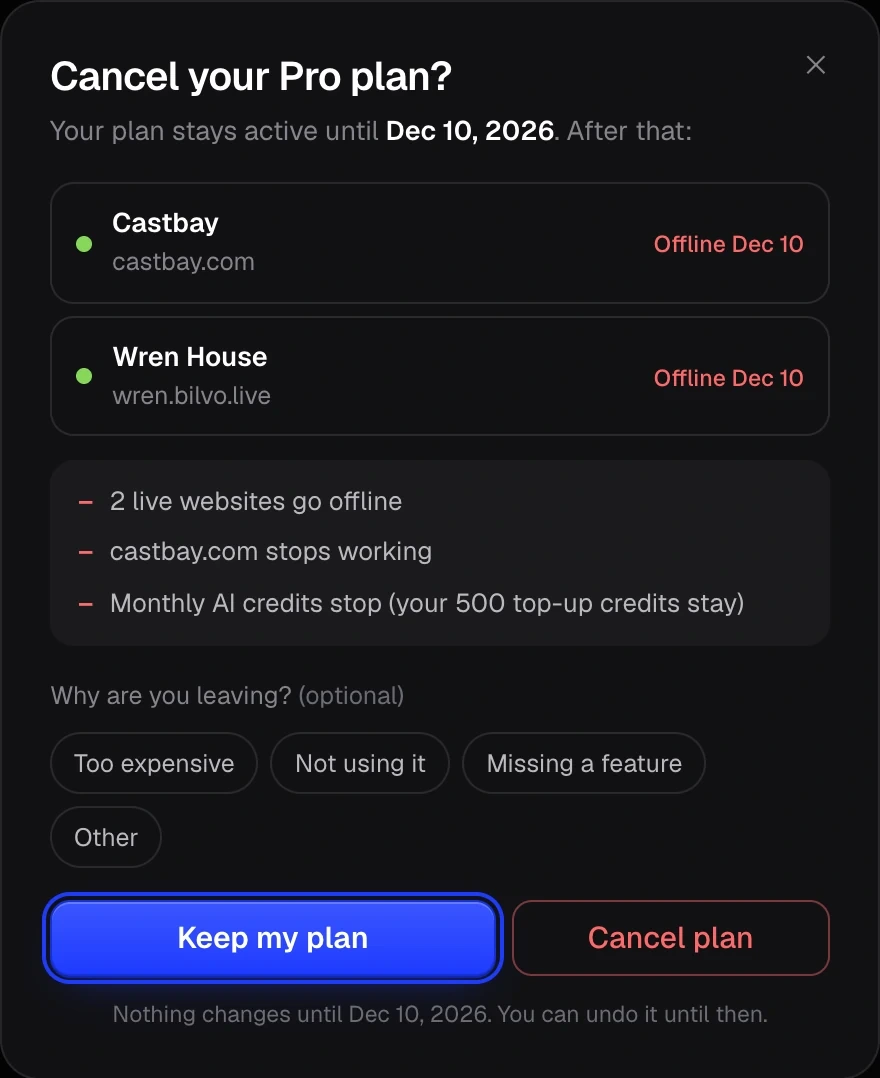
A box shows the date your plan ends and what happens after it: which live websites go offline, which domains stop working, and that your monthly AI credits stop.
Tell us why, if you like
Pick a reason, or skip it. If you pick Too expensive, you'll see a cheaper plan you can switch to instead.
Confirm
Click Cancel plan. To change your mind, click Keep my plan.
Changed your mind?
Until your plan ends, Plan & usage shows when it ends and how many live sites go offline then. Click Keep my plan to undo the cancel. Nothing else changes and you keep paying as before.

What happens on the end date
- Live websites on Bilvo hosting go offline. Visitors see a short page saying the site is offline. This covers your bilvo.live addresses and your own domains.
- Monthly AI credits stop. Top-up credits you bought stay in your account.
- Your sites stay in your account. You can still open and edit them on the Free plan.
- Sites you published to your own hosting are not touched by Bilvo.
Bring your sites back
Pick a plan again on the pricing page. Your sites come back online as soon as your payment goes through. No need to publish again.
Don't see Cancel plan?
Lifetime plans don't renew, so there's nothing to cancel. On a free trial, the link says Cancel trial and you won't be charged. You can also click Manage to change your plan on Stripe's secure page.
More about payments in Billing: upgrade, invoices and cancelling.
Still stuck?
A real person replies by email.