Change your colours and fonts
Change the colours and fonts of your whole site in one place.
Click Styles in the left rail. Changes here update your whole site at once.
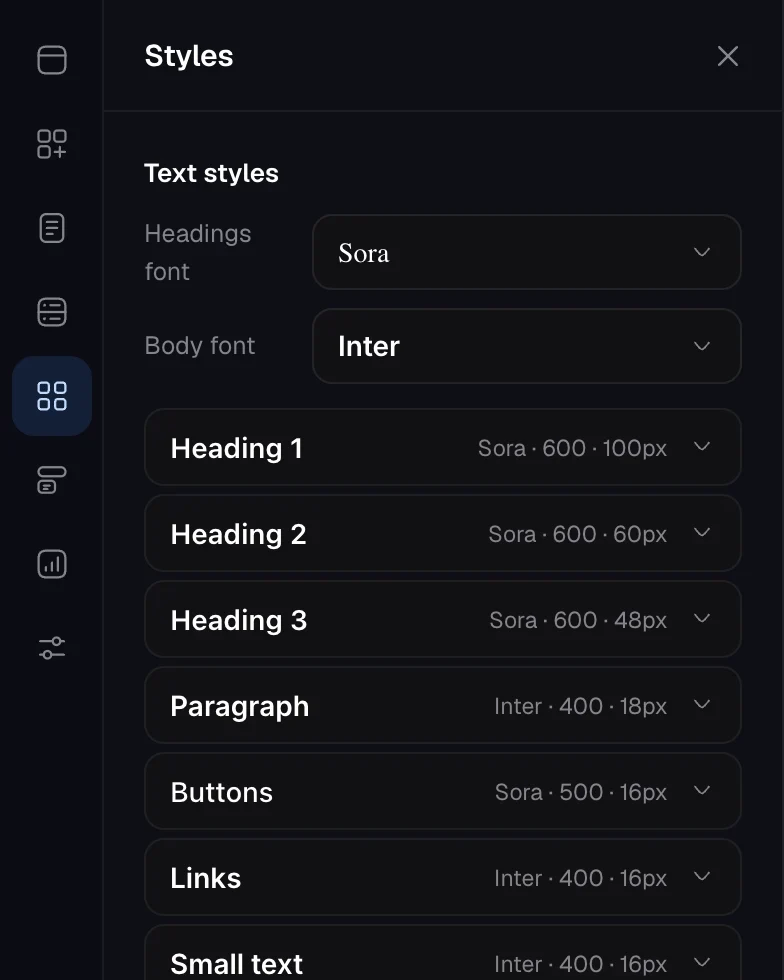
The Styles panel.
Colours
Under Your colors, click a colour to change it. Each one has a job, so you know what it changes:
- Button color and Button text
- Section background and Card background
- Text on the background and Text on dark sections
- Lines and borders
Click Add color to add one more. Other shades in your design lists the rest.
Quick themes
Want a fast new look? Pick a quick theme, like Ocean, Forest or Sunset. One click changes every colour, or both fonts.
Fonts
Pick a pair
Choose a Headings font and a Body font, or pick a ready pair. Pairs are grouped, like Modern, Friendly or Elegant.
Or search for any font
The font picker searches every Google font.
Text styles
Set the size and weight of Heading 1–3, Heading 4–6, Buttons and Links. You can set each one for every device, for tablet and phone, or for phone only.
Save or undo
Click Save style to keep your changes. Changed your mind about one? Click Back to the original.
Just one item?
To change only one title or box, click it. Use Typography and Style in the properties panel. For anything else, ask the AI in the chat.
Still stuck?
A real person replies by email.